See labor cost by project, live
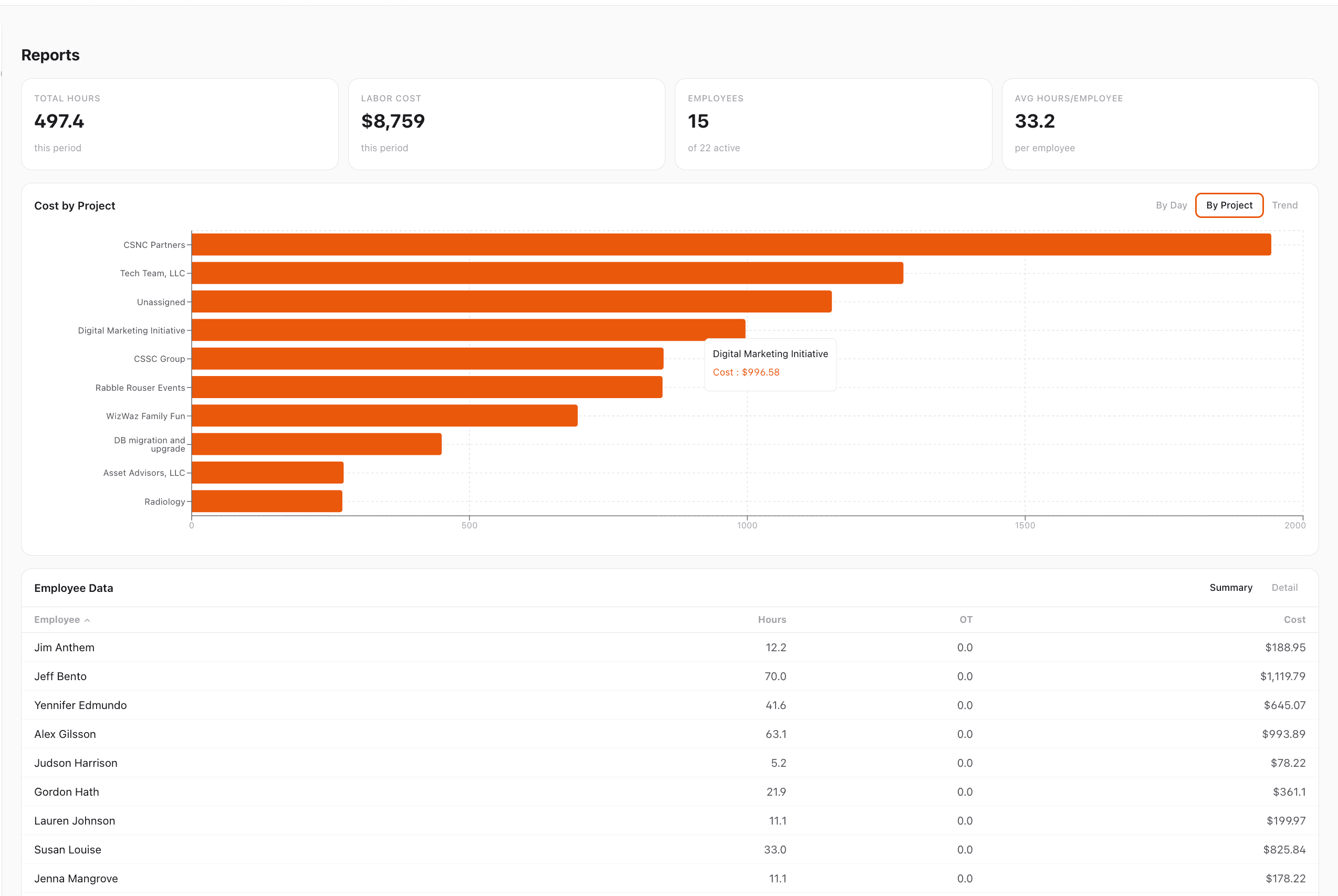
The Reports page rolls up total hours and labor cost per project, so you can compare jobs while they are still running.
Why teams love Projects & Workspaces
Cost by project, live
The Reports page shows labor cost rolled up per project in a sortable bar chart. Compare jobs side by side, spot the ones eating your margin, and catch cost overruns before the work is done.
Hours and dollars in one view
Total hours, labor cost, headcount, and average hours per employee all sit at the top of the Reports page. Drill in by project or employee without leaving the screen.
Multi-location aware
Projects and work sites are separate. A single project can span multiple locations, and a single location can host multiple projects at once — match how your business actually runs, not how the software thinks it should.
Salaried or hourly
Track project hours for salaried team members without putting them on the payroll clock. One dashboard for the whole team, whether they are billed by the hour or not.
Flexible by default
Projects organize work, they do not lock it. Employees can still clock in if a project assignment is missing and you sort out the details later — no more nagging text messages to managers mid-shift.
How it works
StampShift turns time tracking into job costing. Tag every clock-in to a project and work site, and StampShift rolls up hours and labor cost per project automatically. The Reports page shows a live Cost by Project chart alongside total hours, labor cost, headcount, and per-employee breakdowns so you can see what a job is really costing you while it is still running — not after the invoice is sent. Projects and work sites are separate building blocks: a single project can span multiple locations, and a single location can host multiple projects at once. Works for hourly crews and salaried team members on the same dashboard.
Create your projects
Add the jobs, clients, or cost centers you want to track. Each project has a name and can be marked active or archived. Takes under a minute per project.
Assign employees to projects
Pick which employees can clock in to which projects. Assign the whole team, a crew, or a single person — whatever matches how the job is staffed.
Crews clock in with a project
Employees pick a project from a dropdown when they clock in. The punch is tagged automatically, no separate timesheet to fill out.
Watch the numbers roll in
Open the Reports page and switch the chart to "By Project". Labor cost and hours update as your team works. Filter by date range, project, or employee.
Built for every workplace
See how teams across industries use Projects & Workspaces.
Construction & trades
Track hours and labor cost per job site so you can see which jobs are profitable and which are bleeding margin. Run multiple jobs at multiple sites at once without mixing up the totals.
Agencies & professional services
Roll up billable hours by client project for accurate invoicing and retainer tracking. Include salaried staff alongside hourly contractors in the same report.
Events & venues
Track staffing cost per event, show, or production. See exactly what each event costs to staff, compare across events, and price future bookings with real numbers.
Frequently asked questions
Which plan includes project tracking?
Project tracking and the Cost by Project report are included in the Business tier. Starter and Growth plans include full time tracking, scheduling, GPS, and payroll reports, but project tagging is Business tier only.
How is labor cost calculated per project?
StampShift multiplies each employee's hours on a project by their configured hourly rate, then rolls the totals up. Regular, overtime, and double-time rates are applied automatically based on your overtime settings.
Can one project span multiple work sites?
Yes. Projects and work sites are separate. A single project can run at several different work sites, and a single work site can host several active projects at the same time.
Do salaried employees need an hourly rate?
You can still track salaried employees' time against projects without a payroll rate, and their hours will roll up in the Cost by Project report if you set a cost rate for reporting purposes. Keeping their payroll separate from the hourly team is fully supported.
What if an employee forgets to pick a project?
StampShift will not block the clock-in. The punch is tagged as "Unassigned" and shows up in a separate bucket on the Cost by Project chart, so you can review and reassign it later without anyone's shift grinding to a halt.
Related features
Explore more ways StampShift helps your team.
One-Tap Time Clock
Simple employee time clock app that works on any device. One-tap clock in/out with GPS verification. No app downloads required.
Payroll Reports
Two powerful report tools: Payroll Reports with automatic overtime and pay calculations, and Activity Reports with detail/summary views, custom date ranges, and employee or project filters. Export as CSV or Excel.
GPS Geofencing
Set up geofences around work sites and ensure employees can only clock in when on location. GPS tracking for construction, field service, and distributed teams.
Ready to try Projects & Workspaces?
The easiest way to track hours for your hourly team. Try it free for 14 days.
Start Your Free Trial14-day free trial • Cancel anytime